在上一篇文章《华为路由器实验演示:如何配置和使用动态路由协议OSPF》中,整理了关于ospf 的单区域配置,本文将对ospf 的多区域进行配置,有需要的友友可以参考下。
本实验配置思路:
1、基本配置(路由器和PC主机的ip地址)
2、配置骨干区域路由器ospf
3、配置非骨干区域路由器ospf
4、配置边界路由器 ospf
5、测试连通性
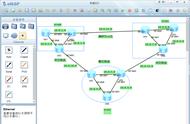
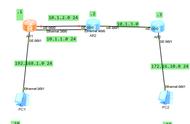
网络拓扑:

详细配置如下:
1、基本配置
AR1
The device is running!

<Huawei>
<Huawei>sys
Enter system view, return user view with Ctrl Z.
[Huawei]undo inf
[Huawei]undo info-center en
Info: Information center is disabled.
[Huawei]int
[Huawei]interface gi
[Huawei]interface GigabitEthernet 0/0/0
[Huawei-GigabitEthernet0/0/0]ip add
[Huawei-GigabitEthernet0/0/0]ip address 10.0.12.1 24
[Huawei-GigabitEthernet0/0/0]int gi 0/0/1
[Huawei-GigabitEthernet0/0/1]ip add 10.0.13.1 24
[Huawei-GigabitEthernet0/0/1]int gi 0/0/2
[Huawei-GigabitEthernet0/0/2]ip add 10.0.15.1 24
[Huawei-GigabitEthernet0/0/2]q
[Huawei]
[Huawei]
AR2
The device is running!

<Huawei>sys
Enter system view, return user view with Ctrl Z.
[Huawei]undo inf
[Huawei]undo info-center en
Info: Information center is disabled.
[Huawei]in gi
[Huawei]int
[Huawei]interface gi
[Huawei]interface GigabitEthernet 0/0/0
[Huawei-GigabitEthernet0/0/0]ip add 10.0.12.2 24
[Huawei-GigabitEthernet0/0/0]int
[Huawei-GigabitEthernet0/0/0]int gi
[Huawei-GigabitEthernet0/0/0]int gi 0/0/1
[Huawei-GigabitEthernet0/0/1]ip add 10.0.24.2 24
[Huawei-GigabitEthernet0/0/1]int gi 0/0/2
[Huawei-GigabitEthernet0/0/2]ip add 10.0.26.2 24
[Huawei-GigabitEthernet0/0/2]q
[Huawei]q
<Huawei>save
  The current configuration will be written to the device.
  Are you sure to continue? (y/n)[n]:y
  It will take several minutes to save configuration file, please wait.......
  Configuration file had been saved successfully
  Note: The configuration file will take effect after being activated
<Huawei>
AR3
The device is running!

<Huawei>sys
Enter system view, return user view with Ctrl Z.
[Huawei]undo in
[Huawei]undo info-center en
Info: Information center is disabled.
[Huawei]
[Huawei]
[Huawei]int gi
[Huawei]int GigabitEthernet 0/0/0
[Huawei-GigabitEthernet0/0/0]ip add 10.0.34.3 24
[Huawei-GigabitEthernet0/0/0]int gi 0/0/1
[Huawei-GigabitEthernet0/0/1]ip add 10.0.13.3 24
[Huawei-GigabitEthernet0/0/1]int gi 0/0/2
[Huawei-GigabitEthernet0/0/2]ip add 10.0.35.3 24
[Huawei-GigabitEthernet0/0/2]int gi 4/0/0
[Huawei-GigabitEthernet4/0/0]ip add 10.0.3.254 24
[Huawei-GigabitEthernet4/0/0]q
[Huawei]q
<Huawei>save
  The current configuration will be written to the device.
  Are you sure to continue? (y/n)[n]:y
  It will take several minutes to save configuration file, please wait.......
  Configuration file had been saved successfully
  Note: The configuration file will take effect after being activated
<Huawei>
AR4
The device is running!

<Huawei>
<Huawei>SYS
Enter system view, return user view with Ctrl Z.
[Huawei]undo inf
[Huawei]undo info-center en
Info: Information center is disabled.
[Huawei]
[Huawei]int gi
[Huawei]int GigabitEthernet 0/0/0
[Huawei-GigabitEthernet0/0/0]ip add 10.0.34.4 24
[Huawei-GigabitEthernet0/0/0]int gi 0/0/1
[Huawei-GigabitEthernet0/0/1]ip add 10.0.24.4 24
[Huawei-GigabitEthernet0/0/1]int gi 0/0/2
[Huawei-GigabitEthernet0/0/2]ip add 10.0.46.4 24
[Huawei-GigabitEthernet0/0/2]int et
[Huawei-GigabitEthernet0/0/2]int eth 4/0/0
[Huawei-Ethernet4/0/0]ip add 10.0.4.254 24
[Huawei-Ethernet4/0/0]q
[Huawei]q
<Huawei>save
  The current configuration will be written to the device.
  Are you sure to continue? (y/n)[n]:y
  It will take several minutes to save configuration file, please wait.......
  Configuration file had been saved successfully
  Note: The configuration file will take effect after being activated
<Huawei>
AR5
The device is running!

<Huawei>sys
Enter system view, return user view with Ctrl Z.
[Huawei]undo inf
[Huawei]undo info-center en
Info: Information center is disabled.
[Huawei]
[Huawei]int
[Huawei]interface gi
[Huawei]interface GigabitEthernet 0/0/0
[Huawei-GigabitEthernet0/0/0]ip add 10.0.15.5 24
[Huawei-GigabitEthernet0/0/0]int gi 0/0/1
[Huawei-GigabitEthernet0/0/1]ip add 10.0.35.5 24
[Huawei-GigabitEthernet0/0/1]int gi 0/0/2
[Huawei-GigabitEthernet0/0/2]ip add 10.0.1.254 24
[Huawei-GigabitEthernet0/0/2]
[Huawei-GigabitEthernet0/0/2]q
[Huawei]q
<Huawei>save
  The current configuration will be written to the device.
  Are you sure to continue? (y/n)[n]:y
  It will take several minutes to save configuration file, please wait.......
  Configuration file had been saved successfully
  Note: The configuration file will take effect after being activated
<Huawei>

AR6
The device is running!

<Huawei>sys
Enter system view, return user view with Ctrl Z.
[Huawei]undo inf
[Huawei]undo info-center en
Info: Information center is disabled.
[Huawei]int gi 0/0/0
[Huawei-GigabitEthernet0/0/0]ip add 10.0.26.6 24
[Huawei-GigabitEthernet0/0/0]int gi 0/0/1
[Huawei-GigabitEthernet0/0/1]ip add 10.0.46.6 24
[Huawei-GigabitEthernet0/0/1]int gi 0/0/2
[Huawei-GigabitEthernet0/0/2]ip add 10.0.2.254 24
[Huawei-GigabitEthernet0/0/2]
[Huawei-GigabitEthernet0/0/2]q
[Huawei]q
<Huawei>save
  The current configuration will be written to the device.
  Are you sure to continue? (y/n)[n]:y
  It will take several minutes to save configuration file, please wait.......
  Configuration file had been saved successfully
  Note: The configuration file will take effect after being activated
<Huawei>
测试各直连的连通性

2、骨干区域路由器配置
AR1
<Huawei>
<Huawei>sys
Enter system view, return user view with Ctrl Z.
[Huawei]ospf 1
[Huawei-ospf-1]area
[Huawei-ospf-1]area 0
[Huawei-ospf-1-area-0.0.0.0]net
[Huawei-ospf-1-area-0.0.0.0]network
[Huawei-ospf-1-area-0.0.0.0]network 10.0.12.0 0.0.0.255
[Huawei-ospf-1-area-0.0.0.0]netw
[Huawei-ospf-1-area-0.0.0.0]network 10.0.13.0 0.0.0.255
[Huawei-ospf-1-area-0.0.0.0]q
[Huawei-ospf-1]q
[Huawei]q
<Huawei>save
  The current configuration will be written to the device.
  Are you sure to continue? (y/n)[n]:y
  It will take several minutes to save configuration file, please wait.......
  Configuration file had been saved successfully
  Note: The configuration file will take effect after being activated
<Huawei>
<Huawei>
AR2
<Huawei>
<Huawei>sys
Enter system view, return user view with Ctrl Z.
[Huawei]osp
[Huawei]ospf 1
[Huawei-ospf-1]area 0
[Huawei-ospf-1-area-0.0.0.0]netw
[Huawei-ospf-1-area-0.0.0.0]network 10.0.12.0 0.0.0.255
[Huawei-ospf-1-area-0.0.0.0]ntet
[Huawei-ospf-1-area-0.0.0.0]net
[Huawei-ospf-1-area-0.0.0.0]network 10.0.24.0 0.0.0.255
[Huawei-ospf-1-area-0.0.0.0]
[Huawei-ospf-1-area-0.0.0.0]q
[Huawei-ospf-1]q
[Huawei]q
<Huawei>save
  The current configuration will be written to the device.
  Are you sure to continue? (y/n)[n]:y
  It will take several minutes to save configuration file, please wait.......
  Configuration file had been saved successfully
  Note: The configuration file will take effect after being activated
<Huawei>
<Huawei>
AR3
<Huawei>
<Huawei>sys
Enter system view, return user view with Ctrl Z.
[Huawei]osp
[Huawei]ospf 1
[Huawei-ospf-1]are
[Huawei-ospf-1]area 0
[Huawei-ospf-1-area-0.0.0.0]netw
[Huawei-ospf-1-area-0.0.0.0]network 10.0.13.0 0.0.0.255
[Huawei-ospf-1-area-0.0.0.0]net
[Huawei-ospf-1-area-0.0.0.0]network 10.0.34.0 0.0.0.255
[Huawei-ospf-1-area-0.0.0.0]netw
[Huawei-ospf-1-area-0.0.0.0]network 10.0.3.0 0.0.0.255
[Huawei-ospf-1-area-0.0.0.0]q
[Huawei-ospf-1]q
[Huawei]q
<Huawei>save
  The current configuration will be written to the device.
  Are you sure to continue? (y/n)[n]:y
  It will take several minutes to save configuration file, please wait.......
  Configuration file had been saved successfully
  Note: The configuration file will take effect after being activated
<Huawei>
AR4
<Huawei>sys
Enter system view, return user view with Ctrl Z.
[Huawei]osp
[Huawei]ospf 1
[Huawei-ospf-1]are
[Huawei-ospf-1]area 0
[Huawei-ospf-1-area-0.0.0.0]netw
[Huawei-ospf-1-area-0.0.0.0]network 10.0.24.0 0.0.0.255
[Huawei-ospf-1-area-0.0.0.0]netw
[Huawei-ospf-1-area-0.0.0.0]network 10.0.34.0 0.0.0.255
[Huawei-ospf-1-area-0.0.0.0]netw
[Huawei-ospf-1-area-0.0.0.0]network 10.0.4.0 0.0.0.255
[Huawei-ospf-1-area-0.0.0.0]
[Huawei-ospf-1-area-0.0.0.0]q
[Huawei-ospf-1]q
[Huawei]q
<Huawei>save
  The current configuration will be written to the device.
  Are you sure to continue? (y/n)[n]:y
  It will take several minutes to save configuration file, please wait.......
  Configuration file had been saved successfully
  Note: The configuration file will take effect after being activated
<Huawei>
测试
测试骨干区域的两台主机间的连通性